Published by SEO 4 ROI — Real SEO. Real Results.
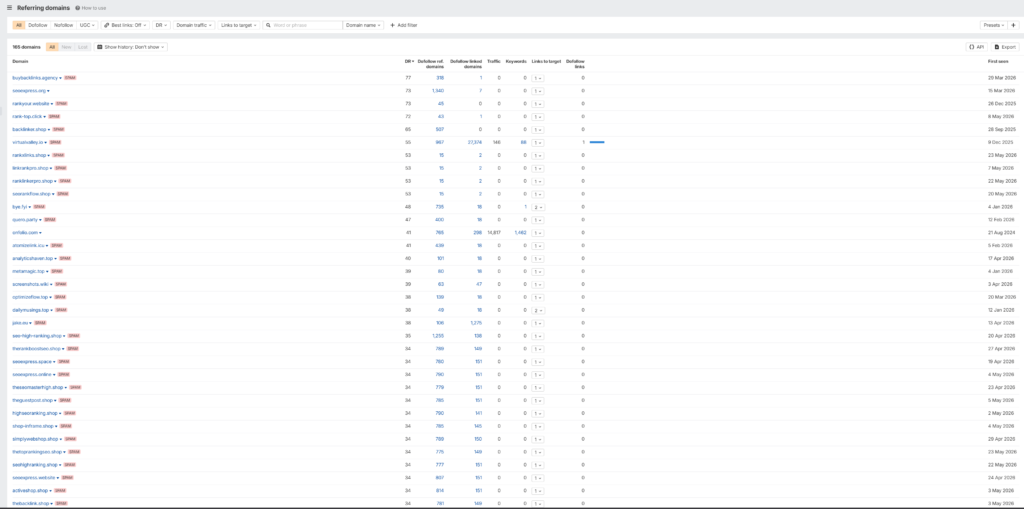
One of our clients recently logged into their Ahrefs account and noticed something alarming: dozens of backlinks from websites they had never heard of, never contacted, and never done business with. Domains like seoexpress-pbn-company.store, elite-high-da-center-seoexpress.store, and luxury-niche-edit-seoexpress-services.store — all pointing at their site, all appearing within the same week.
Sound familiar? You may be looking at a negative SEO attack — and if you don’t know what that is, this post will explain everything.
A negative SEO attack is when someone deliberately tries to harm your website’s search engine rankings by building large volumes of low-quality, spammy backlinks pointing at your domain — without your knowledge or consent.
The goal is to trigger a Google penalty or erode your domain’s authority so your competitors outrank you. It’s the dark side of link building, and while Google has gotten better at ignoring obvious spam, a large enough coordinated attack can still create problems — especially for newer or smaller sites.
Negative SEO attacks typically use:
Here’s what we actually saw in a real Ahrefs backlink report. These domains appeared out of nowhere, clustering around the same dates with nearly identical metrics.
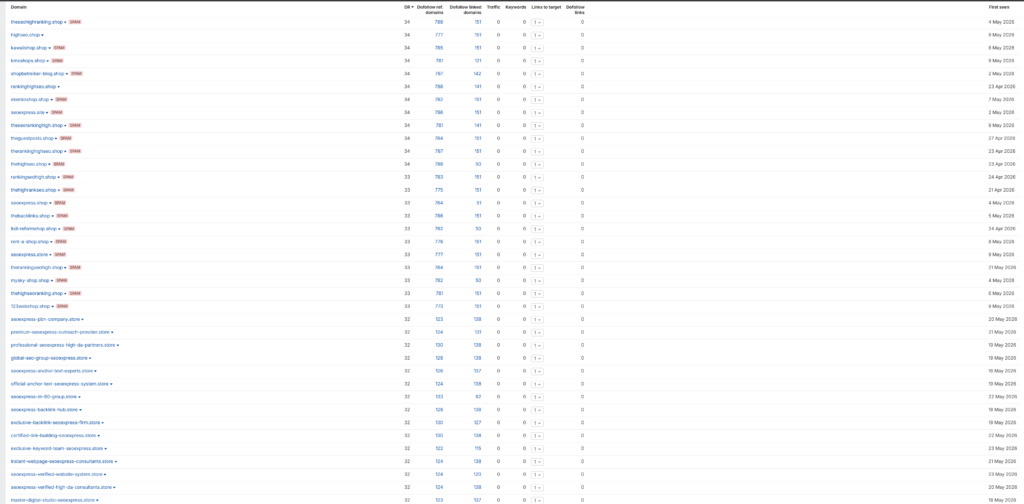
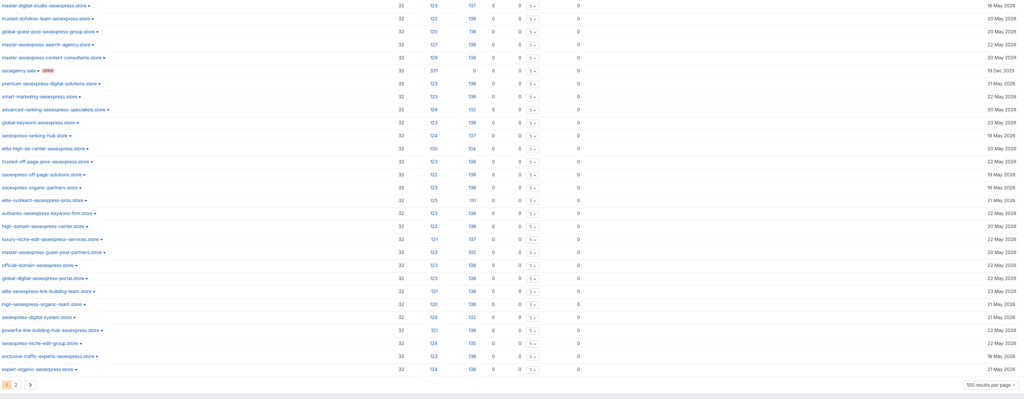
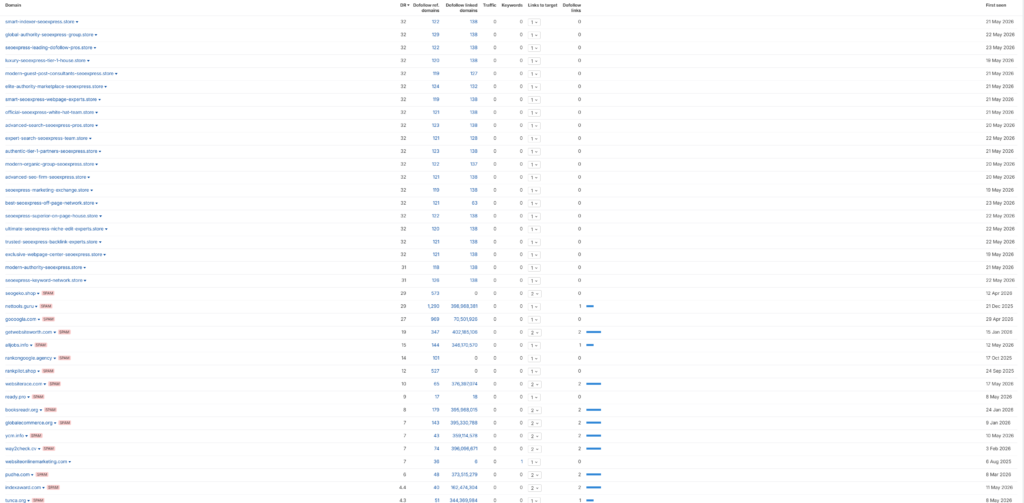
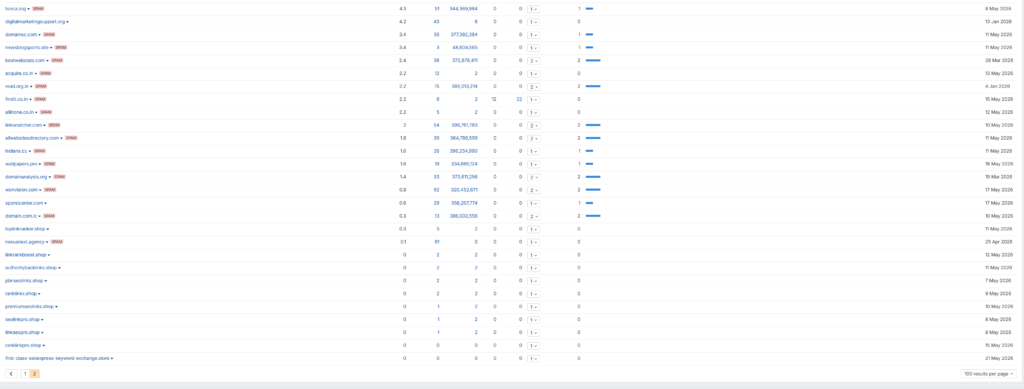
Notice what these domains have in common:
When you’re reviewing your backlink profile in Ahrefs, SEMrush, or Moz, watch for these warning signs:
Legitimate link building happens gradually. If you see 30–100 new backlinks appear within a week from domains you’ve never heard of, that’s a coordinated blast — not organic growth.
Spam campaigns often register batches of cheap domains with the same TLD (.store, .xyz, .club, .online). Seeing 40 links all from .store domains is not a coincidence.
Real businesses don’t name their websites elite-high-da-center-seoexpress.store. When domain names look like they were assembled from SEO buzzwords, they were — by a script.
In our example, every domain had a DR of 32 and nearly identical link counts. When dozens of domains share the same fingerprint, they were created by the same tool or operation.
Check the Ahrefs “Traffic” column. Spam domains show 0 organic visitors because they have no real content and no real audience. They exist only to manufacture links.
A PBN (Private Blog Network) is a collection of websites built specifically to pass link equity to a target site. Some SEOs use them offensively (to rank their own sites), and others weaponize them to harm competitors via negative SEO.
PBN domains are usually:
Google explicitly prohibits PBNs in its spam policies. Links from PBNs are supposed to be ignored or penalized — but “supposed to” doesn’t mean they always are, especially at scale.
Honest answer: probably not in most cases — but it depends on several factors.
Google has significantly improved its ability to automatically detect and ignore obvious spam link patterns. The type of .store PBN blast described above is so transparent that Google’s algorithms likely discount the links automatically.
However, you should still take it seriously if:
The old domain in our client’s case was no longer active, which reduced the risk significantly. For an active, money-making site, treat any coordinated link spam seriously.
Log into Ahrefs → Site Explorer → Backlinks. Filter by “New” links and sort by date. Look for clusters of unfamiliar domains appearing around the same time.
Go to Google Search Console → Security & Manual Actions → Manual Actions. If Google has already penalized your site for unnatural links, you’ll see a notification here. If the panel is clean, you’re likely in the “ignored by algorithm” camp.
In Ahrefs, you can mark individual links or entire domains as “Disavowed” to keep your data clean and track which ones you’ve addressed.
Export the spammy domains and compile them into a disavow file. See the next section for exact instructions.
Upload the disavow file via Google’s Disavow Tool. This tells Google not to count those links when evaluating your site.
Don’t wait for the next attack to find you. Set up proactive alerts — covered in the final section below.
A disavow file is a plain text (.txt) file you upload to Google Search Console. Each line tells Google to ignore a specific URL or entire domain.
# Disavow file for yourdomain.com
# Created: [DATE]
# Reason: Negative SEO spam link campaign - .store PBN domains

domain:seoexpress-pbn-company.store
domain:premium-seoexpress-outreach-provider.store
domain:elite-high-da-center-seoexpress.store
domain:seoexpress-backlink-hub.store
# Continue for each spammy domain...
Key rules:
domain: prefix to disavow an entire domain (recommended over single URLs)# are comments — use them to document your reasoningGo to Google’s Disavow Tool, select your property, and upload the file. Google can take several weeks to process it.
⚠️ Important: The disavow tool is a powerful instrument. Only disavow links you’re confident are harmful or spammy. Disavowing legitimate backlinks can hurt your rankings.
The best defense is early detection. Here’s how to stay ahead of future attacks:
In Ahrefs, go to Alerts → Backlinks → Add Alert. Enter your domain and set it to notify you of new backlinks daily or weekly. You’ll get an email the moment suspicious links start appearing — giving you time to respond before a pattern develops.
Make it a habit to check your Links report in GSC monthly and your Manual Actions tab weekly. GSC is free and often catches things paid tools miss.
Don’t treat your disavow file as a one-time fix. Keep it updated. Every time you identify new spam links, add them to your file and re-upload to GSC. Date your entries so you have a clear history.
This is the most underrated protection. The more high-quality, authoritative links your site earns, the less impact any spam campaign can have. A site with 500 legitimate backlinks from real publishers won’t be rattled by 40 .store spam domains. A site with 10 backlinks might be.
This is exactly why we focus on real, white-hat link building for every client at SEO 4 ROI — because a strong organic link profile is both an offensive and defensive SEO asset.
Seeing dozens of unknown spam domains linking to your site in Ahrefs is unsettling — but it doesn’t have to be a crisis. Here’s the 30-second summary:
If you’re seeing something like this on your site and aren’t sure what to do, reach out to us at SEO 4 ROI for a free site analysis. We’ve been navigating this stuff for 20+ years and we’ll tell you exactly what you’re dealing with — no jargon, no fluff.
About the Author: The team at SEO 4 ROI has been helping small and local businesses grow their organic traffic and revenue since 2006. We specialize in data-driven SEO with full transparency and measurable ROI.
Have questions about your backlink profile? Get a free site analysis →